AWS CloudFormation StackSets enable you to deploy CloudFormation stacks across multiple AWS accounts and regions with a single operation, providing centralized management of infrastructure at scale through AWS Organizations integration. In enterprise environments, multiple StackSet often need to deploy in a specific order. For example, networking infrastructure must be ready before applications can deploy successfully.
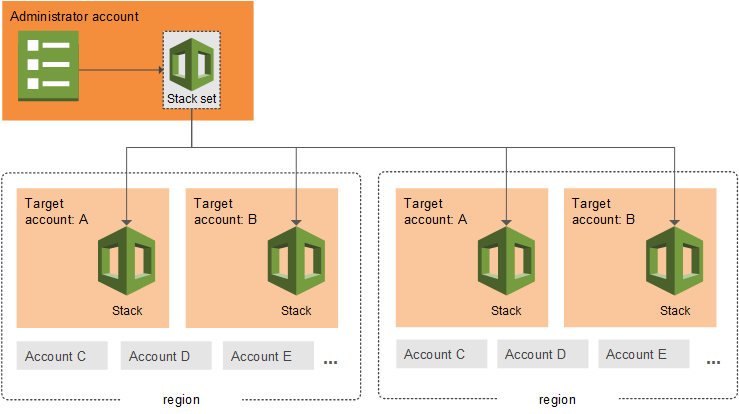
Figure 1: Example of a multi-region AWS CloudFormation StackSet architecture with an administrative account and target accounts
Previously, when multiple StackSets had auto-deployment enabled, they operated independently without coordination. This could cause deployment failures when dependent infrastructure wasn’t ready, forcing customers to implement complex workarounds or disable auto-deployment entirely.
We are announcing StackSets dependencies, a new feature that gives you fine-grained control over the deployment order of your auto-deployed StackSets, elegantly solving these orchestration challenges.
This new feature introduces the ability to define dependencies between StackSets using the new DependsOn parameter in the AutoDeployment configuration. When accounts move between Organizational Units or are added to your organization, StackSets automatically orchestrates deployments according to your defined sequence, ensuring foundational infrastructure deploys before dependent applications.
Let’s walk through this feature with a practical example. Consider an infrastructure setup where you have: A central Infrastructure StackSet that creates IAM roles and networking components and multiple Application StackSets that depend on these foundational resources.
With StackSets dependencies, you can make sure the Infrastructure StackSet completes deployment before any Application StackSets begin, preventing deployment failures due to missing dependencies.
Let’s explore three common scenarios where StackSets Dependencies provides value:
Use Case: You have a foundational Infrastructure StackSet that creates IAM roles and networking components, and multiple Application StackSets that depend on these resources.
The CloudFormation console provides an intuitive interface for managing StackSet dependencies. Log into the AWS console with your credentials, with an IAM user or administrative user, according to your access. Navigate to the Cloudformation service and create a new Stack or add a YAML/JSON template, where you will be configuring dependencies. In the Step 4 of the Create StackSet wizard, you’ll find a new “StackSet dependencies” form field in the Auto-deployment options section. You can use the attribute editor to add StackSet ARNs for dependencies. The console includes input validation for ARN format and helpful alerts about dependency behavior.
Figure 2: CloudFormation StackSets Console – Auto-deployment options view
aws cloudformation create-stack-set \
--stack-set-name Infrastructure \
--permission-model SERVICE_MANAGED \
--auto-deployment Enabled=true,RetainStacksOnAccountRemoval=true \
--template-body file://infrastructure-template.yaml \
--region us-east-1
2. Create App1 with dependency on Infrastructure:
aws cloudformation create-stack-set \
--stack-set-name App1 \
--permission-model SERVICE_MANAGED \
--auto-deployment Enabled=true,RetainStacksOnAccountRemoval=true,\
DependsOn=arn:aws:cloudformation:us-east-1:123456789012:StackSet/Infrastructure:uuid \
--template-body file://app1-template.yaml \
--region us-east-1
3. Create App2 with dependency on Infrastructure:
aws cloudformation create-stack-set \
--stack-set-name App2 \
--permission-model SERVICE_MANAGED \
--auto-deployment Enabled=true,RetainStacksOnAccountRemoval=true,DependsOn=arn:aws:cloudformation:us-east-1:123456789012:StackSet/Infrastructure:uuid \
--template-body file://app2-template.yaml \
--region us-west-2
Now, when accounts are added to your organization, Infrastructure deploys first, then App1 and App2 deploy in parallel after Infrastructure completes.
Use Case: Your application requires both networking and security components to be ready before deployment.
aws cloudformation create-stack-set \
--stack-set-name Networking \
--permission-model SERVICE_MANAGED \
--auto-deployment Enabled=true,RetainStacksOnAccountRemoval=true \
--template-body file://networking-template.yaml \
--region us-east-1
2. Create Security StackSet
aws cloudformation create-stack-set \
--stack-set-name Security \
--permission-model SERVICE_MANAGED \
--auto-deployment Enabled=true,RetainStacksOnAccountRemoval=true \
--template-body file://security-template.yaml \
--region us-east-1
3. Create Application with dependencies on both Networking and Security
aws cloudformation create-stack-set \
--stack-set-name Application \
--permission-model SERVICE_MANAGED \
--auto-deployment Enabled=true,RetainStacksOnAccountRemoval=true,DependsOn=arn:aws:cloudformation:us-east-1:123456789012:StackSet/Networking:uuid,arn:aws:cloudformation:us-east-1:123456789012:Stackset/Security:uuid \
--template-body file://application-template.yaml \
--region us-east-1
As a result, Networking and Security StackSets deploy in parallel, and Application waits for both to complete before starting.
Use Case: You need to update existing StackSets to fix incorrect dependency relationships.
Problem: You have App1 and App2 StackSets. There is an existing dependency that App2 has on App1, but you realize App1 should depend on App2, not the other way around.
First, try to set App1 to depend on App2 (this will fail due to cycle):
aws cloudformation update-stack-set \
--stack-set-name App1 \
--auto-deployment Enabled=true,RetainStacksOnAccountRemoval=true,DependsOn=arn:aws:cloudformation:us-east-1:123456789012:StackSet/App2:uuid \
--use-previous-template
This action will result in error: “Detected cycle(s) between auto-deployment dependencies”. If dependency validation cannot be completed, you’ll receive appropriate error messages to help troubleshoot configuration issues.
Now let’s remove the existing dependency from App2:
aws cloudformation update-stack-set \
--stack-set-name App2 \
--auto-deployment Enabled=true,RetainStacksOnAccountRemoval=true \
--use-previous-template
Now successfully set App1 to depend on App2:
aws cloudformation update-stack-set \
--stack-set-name App1 \
--auto-deployment Enabled=true,RetainStacksOnAccountRemoval=true,DependsOn=arn:aws:cloudformation:us-east-1:123456789012:StackSet/App2:uuid \
--use-previous-template
This scenario demonstrates cycle detection and how to resolve dependency conflicts.
StackSet dependencies is available now in all AWS Regions where CloudFormation StackSets are supported. To get started:
Log into your account in the console and visit the AWS CloudFormation StackSets console or use the AWS CLI/SDK with AWS credentials configured to start controlling StackSet dependencies today.

Tanvi Ravindra Malali
Tanvi Ravindra Malali is an Associate Delivery Consultant in the AWS A2C team in ProServe. She is based in New York City. She handles customer projects and codebases, specializing in AI/ML, Data Engineering and Infrastructure as Code. Outside of work, she loves to paint landscapes, DJing her favorite songs, and dances Tango.

Idriss Laouali Abdou
Idriss Laouali Abdou is a Sr. Product Manager Technical on the AWS Infrastructure-as-Code team based in Seattle. He focuses on improving developer productivity through CloudFormation and StackSets Infrastructure provisioning experiences. Outside of work, you can find him creating educational content for thousands of students, cooking, or dancing.