AWS CloudFormation models and provisions cloud infrastructure as code, letting you manage entire lifecycle operations through declarative templates. Stack Refactoring console experience, announced today, extends the AWS CLI experience launched earlier. Now, you move resources between stacks, rename logical IDs, and decompose monolithic templates into focused components without touching the underlying infrastructure using the CloudFormation console. Your resources maintain stability and operational state throughout the reorganization. Whether you’re modernizing legacy stacks, aligning infrastructure with evolving architectural patterns, or improving long-term maintainability, Stack Refactoring adapts your CloudFormation stacks organization to changing requirements without forcing disruptive workarounds.
Stack Refactoring enables you to move resources between stacks, rename logical resource IDs, and split monolithic stacks into smaller, more manageable components—all while maintaining resource stability and preserving your infrastructure’s operational state. If you’re modernizing legacy infrastructure, aligning stack organization with evolving architectural patterns, or improving maintainability across your cloud resources, Stack Refactoring provides the flexibility you need to adapt your CloudFormation organization to changing
Stack Refactoring operates through a controlled, multi-phase process designed around resource safety. When you initiate a refactor operation, CloudFormation analyzes both source and destination templates, constructs a detailed execution plan, then orchestrates resource movement without disrupting running infrastructure. Resource mappings define how assets transfer between stacks and how logical IDs should change. CloudFormation handles the orchestration complexity automatically – moving resources from source stacks, updating or creating destination stacks, and preserving all dependency relationships through exports and imports.
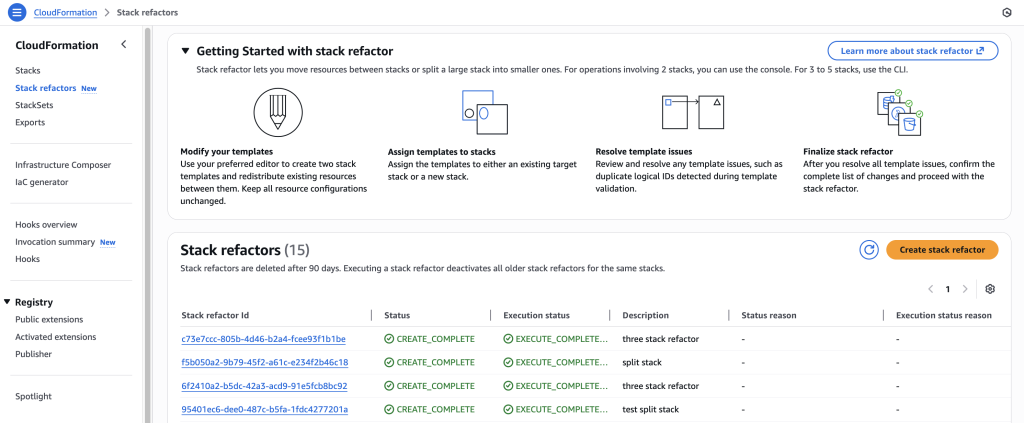
Each refactor operation receives a unique Stack Refactor ID for tracking progress, reviewing planned actions before execution, and monitoring the operation from initiation through completion. This preview-then-execute model gives you confidence in complex refactoring scenarios where dependencies span multiple stacks or templates.
Compared to the CLI, the console experience provides an easier way to view refactor actions, get automatic resource mapping, and easily rename logical IDs.
In this scenario, you have an Amazon Simple Notification Service (SNS) and AWS Lambda Function subscribed to it. As usage patterns evolve, you want to separate the subscriptions into a different stack for better organizational boundaries. You can also rename a resource’s logical ID to improve template clarity or align with naming conventions. Stack Refactoring handles this without recreating the underlying resource.
This scenario demonstrates how to refactor resources across three stacks using the AWS CLI, then review and execute the operation in the CloudFormation console.
Once all 3 stacks have been created successfully. Create refactored templates.
This scenario demonstrates how to move resources between child stacks in a nested stack architecture. Upload child stack templates toAmazon Simple Storage Service (Amazon S3), create a parent stack that references them, then use Stack Refactoring to move resources (like a security group) from one child stack to another. The key is to work directly with the child stack names (which CloudFormation auto-generates based on parent stack name and logical IDs) rather than the parent stack itself. After refactoring, update the parent stack to reference the new child template versions in S3.
This approach lets you reorganize nested stack architectures while maintaining the parent-child relationship structure.
Stack Refactoring offers powerful flexibility, but a few strategic considerations will help ensure smooth operations. Test your refactoring plans in non-production environments first, particularly when working with complex dependency chains or resources that have strict ordering requirements. The preview phase becomes your primary safety mechanism—treat it as a thorough code review, examining each planned action before execution. When moving resources between stacks, pay close attention to cross-stack references. Converting direct references to export/import patterns maintains loose coupling and prevents circular dependencies. CloudFormation will automatically manage these conversions during refactoring, but understanding the resulting architecture helps you avoid introducing fragility into your infrastructure.
For scenarios where you’re emptying a source stack entirely, remember that CloudFormation requires at least one resource per stack. This makes placeholder resources like AWS::CloudFormation::WaitConditionHandle a useful temporary measure—they consume no actual AWS resources and can be safely deleted along with the stack once the refactoring completes.
Document your refactoring decisions alongside the templates themselves. Future maintainers (including yourself in six months) will appreciate understanding why resources were organized in particular ways. Include comments in your templates explaining the reasoning behind stack boundaries and resource groupings.
Consider the operational impact of your refactoring. While resources themselves remain stable, monitoring dashboards, automation scripts, or other tooling that references stack names or logical IDs may need updates. Plan these ancillary changes as part of your refactoring workflow rather than discovering them afterward.
Finally, leverage refactoring as an opportunity to improve template quality more broadly. If you’re already reorganizing resources, consider also updating documentation, standardizing naming conventions, or adding tags for better resource management.
CloudFormation Stack Refactoring transforms how you organize and maintain infrastructure as code, enabling stack architecture to evolve alongside applications and organizational needs. This capability provides the flexibility to restructure without the risk and complexity of traditional resource recreation approaches. Whether you’re breaking apart monolithic stacks, consolidating fragmented infrastructure, or simply renaming resources to match current conventions, Stack Refactoring lets you adapt CloudFormation organization to changing requirements without operational disruption.
To get started, visit the CloudFormation console or explore the AWS CloudFormation API reference for programmatic access patterns. Stack Refactoring is available today in all commercial AWS regions.
Brian Terry, Senior WW Data & AI PSA, is an innovation leader with 20+ years of experience in technology and engineering. Pursuing a Ph.D. in Computer Science at the University of North Dakota. Brian has spearheaded generative AI projects, optimized infrastructure scalability, and driven partner integration strategies. He is passionate about leveraging technology to deliver scalable, resilient solutions that foster business growth and innovation
Idriss Laouali Abdou is a Sr. Product Manager Technical on the AWS Infrastructure-as-Code team based in Seattle. He focuses on improving developer productivity through AWS CloudFormation and StackSets Infrastructure provisioning experiences. Outside of work, you can find him creating educational content for thousands of students, cooking, or dancing.
Sanchi is a Solutions Architect supporting Enterprise customers at AWS. She helps customers design and implement cloud solutions with a focus on DevOps strategies. She specializes in Infrastructure as Code and is passionate about leveraging generative AI in software development
Jamie is a Front End Engineer and has been delivering console features to AWS IaC customers for the last 3 years. Outside of work, Jamie enjoys drawing and playing foosball.