Customers use AWS Lambda to build Serverless applications for a wide variety of use cases, from simple API backends to complex data processing pipelines. Lambda’s flexibility makes it an excellent choice for many workloads, and with support for up to 10,240 MB of memory, you can now tackle compute-intensive tasks that were previously challenging in a Serverless environment. When you configure a Lambda function’s memory size, you allocate RAM and Lambda automatically provides proportional CPU power. When you configure 10,240 MB, your Lambda function has access to up to 6 vCPUs.
However, there’s an important consideration that many developers discover: simply allocating more memory may not automatically make your function faster. If your code runs sequentially, it will only use one vCPU regardless of how many are available. The remaining vCPUs sit idle while you’re still paying for the full memory allocation.
To help benefit from Lambda’s multi-core capabilities, your code should explicitly implement concurrent processing through multi-threading or parallel execution. Without this, you’re paying for compute power you’re not using.
Rust provides excellent support for this pattern. The AWS Lambda Rust Runtime provides developers with a language that combines exceptional performance with built-in concurrency primitives. In this post, we show you how to implement multi-threading in Rust to achieve 4-6x performance improvements for CPU-intensive workloads.
For this analysis, we use bcrypt password hashing as our CPU-intensive workload to evaluate multi-core scaling behavior. This choice is deliberate for several reasons:
Throughout this post, we process batches of passwords and measure how multi-threading improves throughput as we scale from 1 to 6 vCPUs.
AWS Lambda allocates CPU resources proportionally to the configured memory. According to AWS Lambda function memory documentation, at 1,769 MB a function has the equivalent of one vCPU.
vCPU Allocation by Memory:
Memory (MB)
~6
Note: The num_cpus crate returns the number of logical CPUs visible to the Lambda environment, which may differ from the allocated vCPU share. At lower memory configurations, you may see 2 CPUs reported even though only 1 vCPU worth of compute time is allocated.
The solution consists of a Rust Lambda function that:
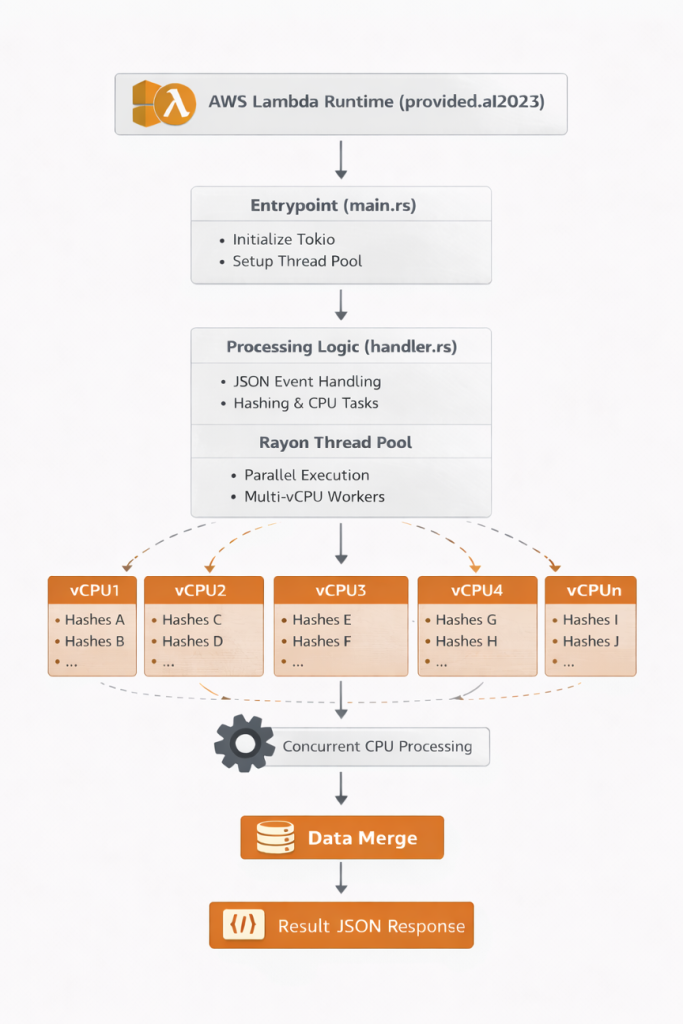
Architecture Diagram: Lambda receives request, initializes Rayon thread pool based on WORKER_COUNT environment variable, processes bcrypt hashes in parallel across multiple vCPUs, and returns results.
Create a new Lambda project using Cargo Lambda:
Update Cargo.toml with the necessary dependencies:
The optimization flags in [profile.release] reduce binary size and improve performance:
First, let’s look at how we initialize the thread pool during cold start:
src/main.rs:
Why initialize in main() and not in the handler?
src/handler.rs:
Thread Pool Initialization at Cold Start: The code initializes the thread pool in main() before the Lambda runtime starts, not during request processing. This approach is designed to eliminate race conditions and provide deterministic behavior across all invocations.
Important Note: Lambda initializes the thread pool once per container. The thread pool configuration retains its original value even if you change the WORKER_COUNT environment variable between invocations within the same container. For production deployments, keep WORKER_COUNT consistent for the function’s lifecycle.
Input Validation: The handler validates that count is between 1 and 1000 to prevent resource exhaustion.
Thread Tracking: The threads_used field proves multi-threading is working by tracking unique thread IDs during parallel processing. This provides empirical validation that work is distributed across multiple threads.
Memory Tracking: The memory_used_kb field reports RSS memory usage by reading /proc/self/statm, providing visibility into actual memory consumption.
Mode Selection: The function supports three modes:
With the implementation complete, let’s compile the function for Lambda’s environment and deploy it to AWS.
The build process produces a binary of approximately 1.7 MB (uncompressed) or 0.8 MB (zipped).
Use Cargo Lambda to deploy the function with your desired memory configuration and worker count.
Note: To test different configurations, repeat the build and deploy commands with different --memory values and WORKER_COUNT settings for each configuration you want to benchmark. For comprehensive testing across architectures, build with --arm64, deploy all memory configurations, then rebuild with --x86-64 and deploy again.
The Lambda execution role needs the following permissions:
After deployment, verify the function works correctly by invoking it with a test payload.
We tested multiple configurations on ARM64 (Graviton2) to measure the impact of multi-threading.
Test workload: Processing 20 bcrypt password hashes (cost factor 10)
Note: Benchmark results may vary between runs due to factors such as Lambda placement, underlying hardware differences, and AWS infrastructure conditions. The numbers presented here are representative of typical performance observed across multiple test runs.
Cold Start Performance: Rust’s cold start initialization times are consistently between 19-28 ms across all memory configurations and architectures. ARM64 (Graviton2) shows slightly faster cold starts (19-23 ms) compared to x86_64 (26-29 ms). Both are significantly faster than interpreted runtimes because the binary is pre-compiled.
Near-Linear Scaling: Both architectures achieve impressive speedups:
Latency Consistency: The P95 and P99 metrics show excellent consistency:
Both architectures show consistent latency at maximum parallelization.
Let’s analyze the cost implications of different configurations for processing 20 bcrypt hashes.
Cost Comparison: ARM64 vs x86_64 (us-east-1, as of January 2026):
Cost Formulas:
Key Insight: The 2 vCPU ARM64 configuration provides the lowest cost at $36.46 per million invocations while achieving 1.41x speedup. All ARM64 configurations remain cost-competitive ($36-$39 range) despite significant performance differences, demonstrating how increased throughput can offset higher memory costs.
Choosing the Right Configuration:
To delete the resources created in this post:
Note: If you deployed multiple configurations for testing, you’ll need to delete each function individually by repeating the delete command with each function name, or use the SAM template for bulk cleanup:
When you allocate more memory to your Lambda function, AWS provides proportionally more vCPUs—up to 6 vCPUs at 10,240 MB. However, sequential code only uses one vCPU, leaving the additional compute power idle while you pay for the full allocation. Multi-threaded Rust with Rayon enables you to harness all available vCPUs for CPU-intensive workloads, transforming unused capacity into real performance gains.
Our benchmarks demonstrate this clearly:
The key takeaway: If your Lambda function performs CPU-intensive work and you’re allocating more than 1,769 MB of memory, you likely have multiple vCPUs available. Without multi-threading, those vCPUs sit idle. Rayon’s parallel iterators allow you to switch from sequential to parallel processing by changing .iter() to .par_iter() in your code.
Recommended starting point: ARM64 with 4096 MB (3 workers) offers an excellent balance of cost and performance for most workloads. Scale up to 6 vCPUs for latency-critical applications, or down to 2 vCPUs for maximum cost savings.
The complete sample code, SAM template, and test scripts from this post are available at Github Repository.